100% Offline · AES-256-GCM Encrypted · Free

Stop Typing.
Start AutoFilling.

AutoFill Pro fills any form on any website instantly — Zoom registrations, Google Forms, custom checkouts and more. Your data stays on your device, always encrypted.

Any Website
AES-256 Encrypted
0 Data Sent Online
Custom Fields
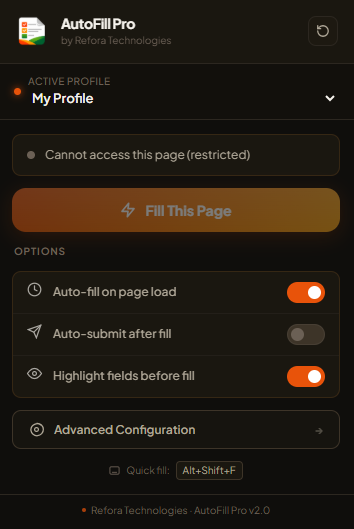
AutoFill Pro Popup

Everything You Need.
Nothing You Don't.

Engineered for professionals who care about speed, privacy, and full control over their data.

Universal Fill Engine

Works on any website, any form, any language. Our fuzzy-matching algorithm intelligently identifies fields by label, placeholder, aria attributes, and nearby text — no configuration needed.

Zoom Webinars Google Forms Custom Sites React Apps

AES-256 Encrypted

All your data is encrypted with military-grade AES-256-GCM on your device using the Web Crypto API. Nothing ever leaves your browser.

Multiple Profiles

Create separate profiles for Work, Personal, University, or any role. Switch between them in one click from the popup.

Infinite Custom Fields

Add unlimited custom field mappings — "Branch → Colombo", "Student ID → 12345". Supports text, dropdown, email, and phone types.

Smart URL Rules

Define rules to automatically switch to the right profile when visiting certain websites. Set it once, forget it forever.

Keyboard Shortcuts

Press Alt+Shift+F to fill any page without opening the extension. Speed through forms faster than ever.

Fill History Log

A detailed log of your last 50 autofill events — when, where, and how many fields were filled. Full transparency.

Export & Import

Backup all your profiles as an encrypted JSON file. Import on any other device, or restore after reinstalling Chrome.

See It In Action.

Every screen is crafted for clarity and efficiency.

AutoFill Pro Screenshot
Quick Fill Popup

Up and Running
in 3 Steps.

01

Install the Extension

Add AutoFill Pro to Chrome from the Web Store in one click. No account required.

02

Enter Your Details

Open the Advanced Configuration and enter your info once. Create multiple profiles if needed.

03

Fill Any Form

Click "Fill This Page" or press Alt+Shift+F. Watch every field fill automatically in milliseconds.

Your Data Stays
With You. Always.

AutoFill Pro was built with a no-compromise approach to privacy. We don't have servers. We don't have databases. We don't have accounts.

AES-256-GCM Encryption Data encrypted using the browser's native Web Crypto API with a device-unique key
Zero Network Requests Extension makes absolutely no outbound connections — works fully air-gapped
Local Storage Only Everything stored in Chrome's sandboxed local storage — never synced to any cloud
Manifest V3 Compliant Built on Chrome's latest security-first extension standard
AES-256-GCM

Built-In Support for
Your Favourite Platforms.

Zoom Webinars Registration forms auto-filled
Google Forms Any and all form fields
Zoom Meetings Meeting join & registration
Any Custom Site Add via URL Rules dashboard
React / Vue / Angular Synthetic event dispatch built-in
Custom Dropdowns Comboboxes & select elements

Common Questions.

Yes, 100% free. There are no subscription tiers, no premium locks, and no in-app purchases. All features are available to all users, forever.
No. AutoFill Pro injects values using standard browser events that are identical to a human typing. Websites cannot distinguish it from real user input.
No. By design, AutoFill Pro intentionally skips type="password" fields for your security. It is not a password manager — it's a form filler for registration and information forms.
Your data is stored in Chrome's local storage and is deleted when the extension is uninstalled. We strongly recommend using the Export feature to back up your profiles before uninstalling.
Absolutely! AutoFill Pro is 100% offline-first. It makes zero network requests. It will work perfectly in airplane mode or on any air-gapped network.
By default, automatic background filling (auto-fill on page load) is restricted to Zoom and Google Forms to avoid unintended fills. You can add any other URL in the URL Rules dashboard. Manual filling via the popup button works on any page, any time.

Ready to Stop Typing?

Join thousands of users who've already saved hours of repetitive form-filling. Install AutoFill Pro and fill your first form in under 60 seconds.

Add to Chrome — Free